AI will find your sensitive data. The question is whether you did first.
PKWARE discovers your sensitive data across endpoint, cloud, and the mainframe most tools never reach, then protects it all under one policy. So when your data is exposed, and it will be, the sensitive part is already locked down.
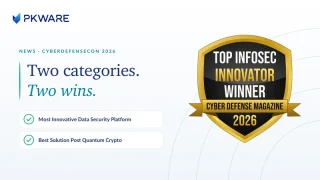
 Winner · 2026Most Innovative Data Security Platform & Best Solution Post Quantum Crypto
Coverage across every surface, mainframe included. Representative interface.
Trusted by leading organizations for over 40 years




Protecting 21 of the 25 largest U.S. commercial banks and 30% of the Fortune 100.
PK Protect on Gartner Peer Insights
PK Protect
“PKWARE is great to work with, support is very responsive and remediates issues in a timely manner.”
Director of IT — Banking
Director of IT in the Banking Industry gives PK Protect a 5/5 rating in the Gartner Peer Insights™ Data Masking market. Read the full review.
The shift
Your data left the building. Your protection didn’t.
Your sensitive data no longer sits in one datacenter you can wall off. It’s on laptops, in cloud buckets, inside SaaS apps, and still running on the mainframe that clears your transactions. Most tools guard just one of those places and stop at its edge.
The gaps between them are where breaches happen. A file gets classified in one system, then travels somewhere its protection doesn’t follow.
PKWARE was built to close the gap.
What we do
We find your sensitive data, then we protect it. That’s the whole job.
Compliance coverage
One policy, mapped to the frameworks you answer to.
Before the model sees a thing
Everyone’s asking if your data is AI-ready. Almost nobody explains how you get there.
Getting AI-ready isn’t a policy slide. It’s work on the actual files: find the sensitive data, classify it, and protect it in place, before anything with a prompt can reach it.
That’s the step the AI-first pitch skips. It’s also the step we’ve done longer than anyone. Do it once and every model, copilot, and pipeline inherits data that’s already safe to use.
See how the remediation works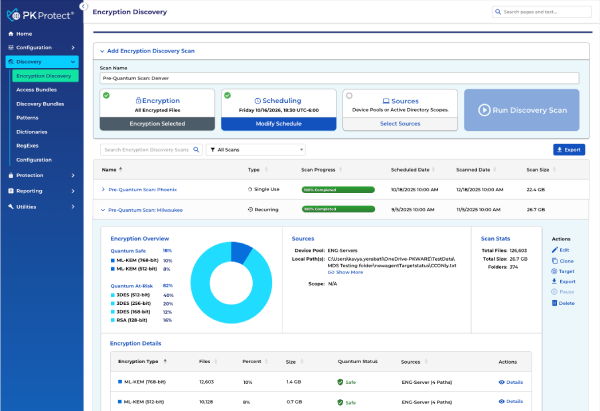
No wrong door
One engine.
Start where you are.
One policy engine finds sensitive data, classifies it, and protects it with encryption, masking, and redaction. Don’t know where your exposure is? Start with discovery. Already know? Go straight to protection. One policy follows the data either way.
Find what you can’t see
“I don’t know where all my sensitive data is.”
Find it across every surface, classify it, and protect it under one policy that travels with the file. Already run discovery elsewhere? Bring its findings and go straight to protection: encrypt, mask, redact, quarantine, or delete.
Lock down what’s moving
“Protect the data moving through my jobs tonight.”
High-throughput protection built into the batch and transfer jobs your business already runs tonight, on every platform. Encrypt under one policy.
Proof at scale · Fiserv
One encryption layer holding the financial plumbing together.
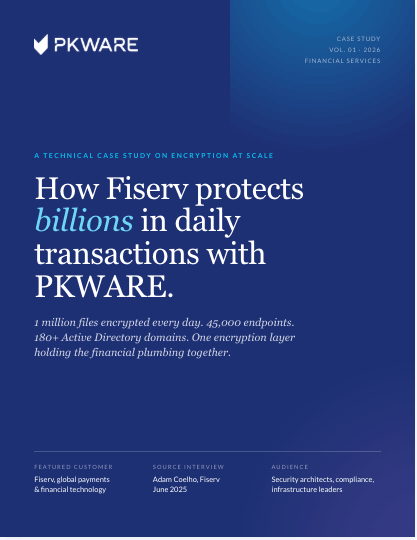
Fiserv has run PKWARE as its encryption backbone for over five years, across a multi-cloud, post-M&A, regulated environment that never stops moving money.
The core of how we’re using PKWARE Endpoint Manager is encryption… if it’s down… we’re holding up a few billion dollars’ worth of transactions.
Why PKWARE
We’ve protected regulated data since 1986, including the systems every newer tool leaves out.
We cover the mainframe. Most tools stop at the cloud edge.
Your most sensitive records still live on IBM Z and IBM i. PKWARE discovers, classifies, and encrypts them natively, under the exact same policy as endpoint, cloud, and Microsoft 365.
Only PKWARE covers IBM Z and IBM i, where the transactions actually clear.
Protection that follows the data
The policy travels with the file, not the folder. Move it, copy it, share it. It stays protected.
Forty years of proof, not forty months
We’ve protected regulated data through every platform shift since 1986. The category is new. We aren’t.
Post-quantum, in the same update
Harvest-now-decrypt-later is already happening. Go crypto-agile and swap to quantum-safe algorithms without re-architecting.
Data privacy is going to continue to be important. And given that we operate at a global scale, we have to stay on top of that. This is why we are making investments in technology and working with partners like PKWARE.
By role
Whoever answers for the data, we built the view for.
Security
Cut the blast radius before the breach, not after.
ExploreAI, Data & Privacy
Know where personal and AI-bound data lives, and prove it’s handled right.
ExploreCompliance
Map coverage to every framework and audit on demand.
ExploreInfrastructure
Protect the mainframe and every platform under one engine.
ExploreStraight answers
The questions buyers actually ask.
PKWARE finds sensitive data across endpoint, cloud, Microsoft 365, and the mainframe, then protects it under one policy with discovery, classification, encryption, masking, and audit. It’s data security that follows the data wherever it moves.
PK Protect is discovery-led: it finds sensitive data everywhere it lives, then classifies and protects it. PK Encrypt is protection-led: it encrypts the data moving through your batch and transfer jobs on z/OS, IBM i, Windows, Linux, and Unix. Same engine, two entry points.
Yes. PKWARE discovers, classifies, and encrypts sensitive data natively on IBM Z (z/OS) and IBM i, under the same policy as endpoint and cloud. Most modern data security platforms stop at the cloud edge and leave the mainframe uncovered.
Yes. PKWARE supports post-quantum encryption and crypto-agility, so you can move to quantum-safe algorithms without re-architecting. That matters now because attackers can harvest encrypted data today and decrypt it once quantum computers are capable.
PKWARE prepares data before AI reaches it: find the sensitive data, classify it, and protect it in place, so models, copilots, and pipelines only ever see data that’s already safe to use. It’s the remediation step that makes data genuinely AI-ready.
Start here
Find out where your exposed data lives. Then protect it.
We’ll show you where your sensitive data is hiding, mainframe included, and what it takes to lock it down.
Trusted for 40 years, protecting regulated data across every platform shift